


 | Published: February 22, 2023 | Updated: June 2, 2026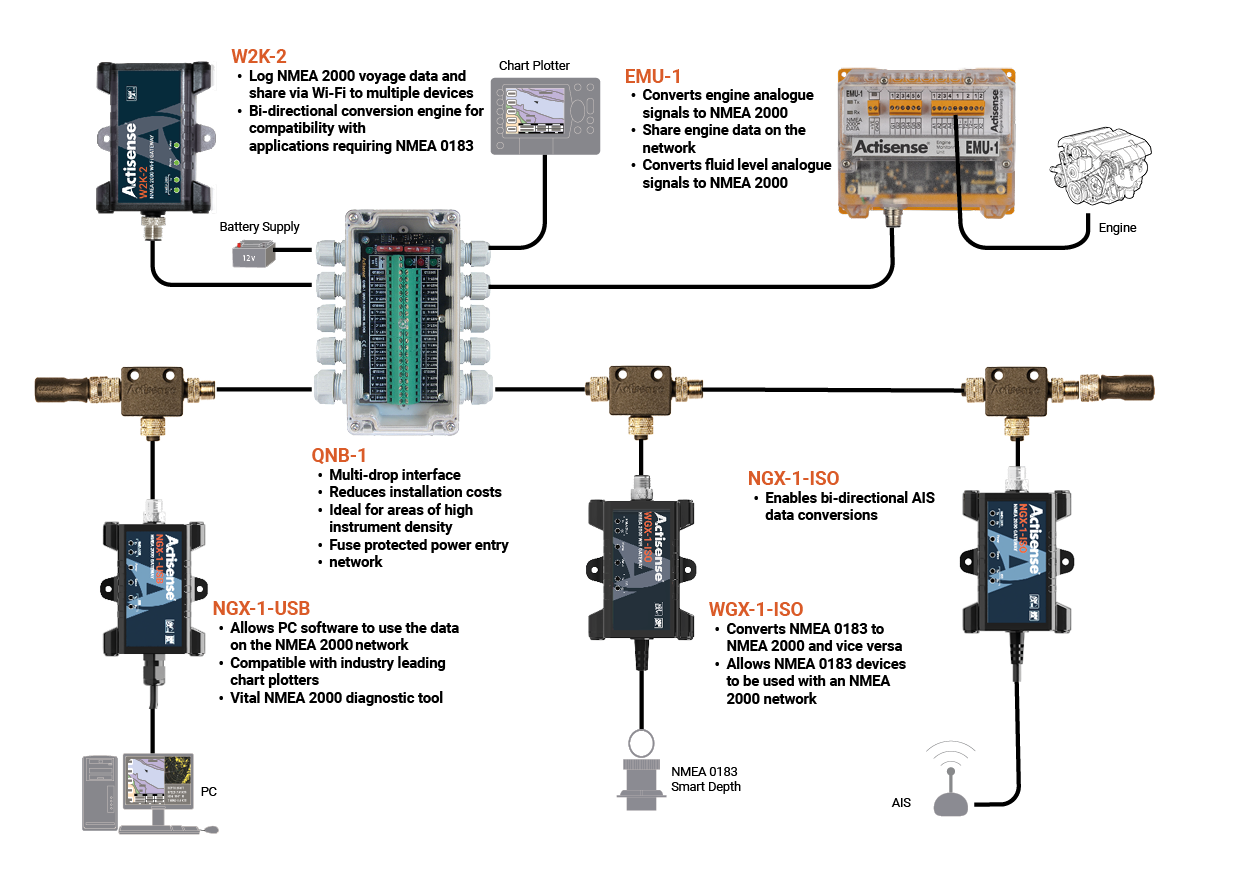
Building an NMEA 2000 network can be a daunting task, with a number of standards and specifications that should be adhered to. However, it’s not as overwhelming as it looks, and as long as you follow the fundamentals, you’ll be off to a solid start. Below, we’ve outlined the three core fundamentals that underpin the NMEA 2000 specification, and gone deeper into the technical reasoning behind each requirement, so you understand not just what to do, but why it matters.
Background: What is NMEA 2000?
NMEA 2000 is a plug-and-play communications standard used for connecting marine electronics: chartplotters, GPS receivers, AIS transponders, engine monitors, wind instruments, autopilots, and more. It is built on top of the Controller Area Network (CAN bus) protocol, originally developed for the automotive industry, and uses a differential two-wire signalling scheme that is highly resilient to electrical noise, an important property in the marine environment.
Data is transmitted as Parameter Group Numbers (PGNs), each representing a specific type of information such as vessel speed, heading, depth, or engine RPM. Devices on the network broadcast PGNs at regular intervals, and any other device on the same backbone can receive and act on that data.
The standard is maintained by the National Marine Electronics Association (NMEA).
1. Cable and connector types
NMEA 2000 adopts the DeviceNet standard for its physical cabling and connectors. DeviceNet is a widely used industrial networking standard, and borrowing it means that N2K hardware is broadly compatible across manufacturers, a major advantage when sourcing components or expanding a network.
Cable specifications
The NMEA 2000 specification defines three cable grades, each suited to different installation environments:

*Mid cable current capacity varies significantly depending on the connector used: a Micro connector limits it to 4 A, while a Mini connector supports the full 8 A. Always verify the connector rating independently.
The key parameters to understand are:
- Backbone length is the total length of the main bus trunk from one terminator to the other. Lite cable is limited to 100 m due to its higher conductor resistance (0.057 Ω/m), which increases voltage drop and signal degradation over distance. Mid and Heavy cables use thicker conductors with substantially lower resistance (0.015 Ω/m and 0.012 Ω/m respectively), enabling a 250 m backbone.
- Drop cable length is fixed at a maximum of 6 metres regardless of cable grade. This is a hard limit imposed by CAN bus timing constraints; longer drop cables create signal reflections and propagation delays that can cause bus errors.
- Cumulative drop length across the entire network must not exceed 78 metres. This is an often-overlooked constraint. On large commercial vessels with many nodes spread across the ship, careful network planning is essential to stay within this limit.
Why cable grade matters: voltage drop
N2K networks are bus-powered, meaning devices draw their CAN transceiver operating power directly from the backbone via the power conductors. The backbone is typically supplied at 12 V DC, and the NMEA 2000 standard requires that every device on the network receives between 9 V and 16 V at its T-connector.
As current flows through a cable, voltage drops according to Ohm’s Law (V = I × R). Lite cable, with its higher resistance per metre (0.057 Ω/m), will exhibit significantly more voltage drop per ampere of load compared to Mid (0.015 Ω/m) or Heavy (0.012 Ω/m) cable. On a fully populated network with many devices drawing current, this can push peripheral nodes (those at the far end of the backbone) below the 9 V minimum, causing intermittent resets or total device failure.
For this reason, Mid or Heavy cable is strongly recommended for larger installations, and it is sometimes necessary to add supplementary power injectors partway along the backbone to maintain adequate voltage at all nodes.
Connectors
NMEA 2000 uses 5-pin connectors:
| Function | Wire Colour |
|---|---|
| Shield / Drain | Bare / Black |
| NET-S (Power +) | Red |
| NET-C (Power –) | Black |
| CAN-H (Signal High) | White |
| CAN-L (Signal Low) | Blue |
Lite cable uses Micro connectors exclusively. Mid cable can use either Micro or Mini connectors, but note that using a Micro connector on Mid cable limits the current capacity to 4 A rather than the cable’s potential 8 A with a Mini connector. Heavy cable uses Mini connectors only.
The T-connector (or tee piece) is the standard method for connecting a device to the backbone. One port connects to each side of the backbone, and the third port accepts the drop cable leading to the device. T-connectors must be rated for the cable grade in use; mixing connector types requires an adapter and may reduce the current rating of that section.

2. Number of devices
Physical node limit
The NMEA 2000 standard sets a maximum of 50 physical nodes on a network. This is not an arbitrary figure; it is derived from the CAN bus electrical specification. The CAN bus transceiver standard (ISO 11898) defines a maximum bus capacitance, and each node adds a small amount of capacitive loading. At 50 nodes, the cumulative capacitance approaches the point at which signal integrity begins to degrade.
Each physical device connected to the backbone counts as one node, regardless of how many addresses it claims.
Source address limit
Separately, the NMEA 2000 address space allows for up to 252 source addresses (0–251; address 255 is reserved for the global address, and 254 for the null address). Each device that communicates on the network must claim a unique source address through a process defined in the standard.
Some devices claim multiple addresses: one for the physical unit and additional addresses for each logical function or virtual data server it provides. Careful attention to both limits is needed when planning larger or more complex installations. For example, our W2K-2 NMEA 2000 Wi-Fi Gateway claims one address on the ‘physical’ product, and then one for each enabled data server. This results in up to 4 source addresses being claimed.
Bridges can be used to overcome some of the network limitations; however, this makes for a more technical subject, which will be covered in a different article in the future.
3. Termination
The physics of signal reflection
NMEA 2000 uses differential CAN bus signalling, where data is encoded as the voltage difference between the CAN-H and CAN-L conductors. The characteristic impedance of N2K cable is 120 ohms. When a signal travelling along the bus reaches an unterminated end, it encounters an impedance discontinuity and a portion of the signal energy is reflected back down the cable. These reflections arrive at transceivers slightly delayed and can corrupt the original signal, causing bit errors, CRC failures, and bus-off events.
Correctly terminating a network is something often forgotten about or missed. There should be a 120ohm ¼ watt terminator at either end of the backbone. These terminators are there to limit and prevent signal reflection, which can cause data and communication issues on the network. Sometimes the installation of a terminator on a sailing boat can be a bit of a challenge as the backbone has to run up the mast. These areas are limited in space, awkward and not always reachable. To overcome this, a terminator must still be used, but an inline terminator can replace the standard ‘end of network’ terminator.
Placement
Terminators must be placed at the physical ends of the backbone. Common mistakes include:
- Placing the terminator at the device end of a drop cable (the unterminated backbone end continues to cause reflections)
- Using only one terminator (halving the bus load and leaving one end open)
- Using the wrong resistance value (some installers mistakenly use 100 ohm or 150 ohm terminators)
Testing Termination
A simple way to verify that a network is correctly terminated before powering it up is to measure the resistance between the CAN-H and CAN-L conductors at any T-connector with the network unpowered. A correctly terminated, unpowered network should read approximately 60 ohms (the two 120 ohm terminators in parallel). A reading of 120 ohms indicates only one terminator is present; an open circuit (very high resistance) indicates no terminators; and a reading close to zero suggests a short circuit somewhere on the bus.
Additional Considerations
Power Injection
The N2K backbone requires a dedicated power supply, separate from other vessel DC circuits, typically protected by a fuse appropriate to the cable grade and network load. The power tap should ideally be placed at or near the centre of the backbone to minimise voltage drop at the extremities. For longer backbones or heavily loaded networks, a second power tap at a different point may be needed.
Grounding and Shielding
The cable shield (Pin 1) must be connected to the vessel’s DC negative bus at one point only, typically at the power tap. Connecting the shield to ground at multiple points creates a ground loop, which can introduce electrical noise onto the signal conductors and cause intermittent communication errors.
Network Diagnostics
Several tools are available for diagnosing N2K network problems, ranging from simple bus analysers that display raw PGN traffic to more sophisticated tools that report bus load, error frame counts, and address conflicts. Monitoring bus load is important; NMEA 2000 has a theoretical maximum data rate of 250 kbps, and a heavily loaded network may begin to drop lower-priority messages. Reducing the transmit rate of high-frequency PGNs (such as heading or position, which some devices broadcast at 10 Hz or more) can free up bandwidth for other devices.
Summary
| Parameter | Limit |
| Max physical nodes | 50 |
| Max source addresses | 252 |
| Max backbone (Lite) | 100 m |
| Max backbone (Mid / Heavy) | 250 m |
| Max drop cable | 6 m |
| Max cumulative drop length | 78 m |
| Termination resistance | 120 Ω at each end (60 Ω measured) |
| Bus voltage range at device | 9–16 V DC |
| Data rate | 250 kbps |
Following these fundamentals of correct cable selection, respecting node and address limits, and proper termination will give you a reliable, standards-compliant NMEA 2000 network.
For more on building and testing your NMEA 2000 network, read our article here.
 3 easy ways to diagnose NMEA network issues
  The basics of building and testing your NMEA 2000 Network
  3 common mistakes when installing NMEA devices