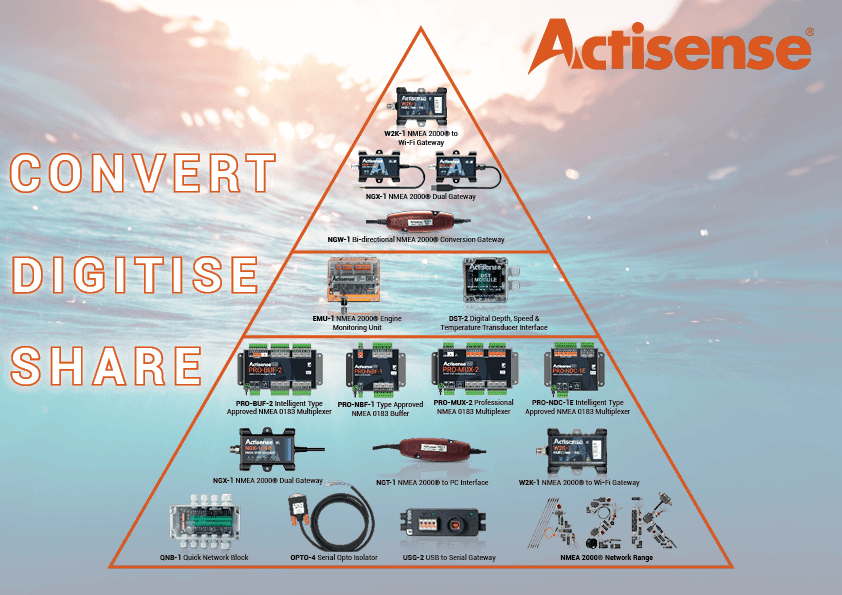
The NGW-1 supports all versions of NMEA 0183. Devices that use RS232 or RS422 voltage levels are accepted and connections that use ground or differential connections are suitable. The NGW-1 automatically adapts to the electrical requirements of the connected devices...
Read More
With the NGW-1 connected to your PC, select the correct COM port for your NGW-1 from the drop down menu in the Actipatch...
Read More
When connecting an NGW-1 with an ISO-Drive to a PC there are three options:
Read More
Yes you can. To change/update firmware, please follow the instructions detailed on Pages 8 and 9 of the NGW-1 User Manual.
..
Read More
The NGW-1 Conversion Lists are available on the download page – there is one list for the standard firmware variants (NGW-1-ISO, NGW-1-USB and NGW-1-STNG) and one list for the AIS firmware variants (NGW-1-ISO-AIS and NGW-1-USB-AIS)...
Read More
All ISO-Drive variants (NGW-1-ISO, NGW-1-ISO-AIS and NGW-1-STNG) are completely powered from the NMEA 2000 network and have an NMEA 2000 LEN of 1 (50 mA or less). Once connected to a powered and terminated NMEA 2000 network, the NGW-1-ISO LEDs will flash...
Read More
All NGW-1 variants have a standard NMEA 2000 drop cable and connector (DeviceNet M12, A polarised, male Micro C) for direct connection to an NMEA 2000 backbone T-piece or adapter cable for manufacturer proprietary networks...
Read More
No. The voltage supplied to the QNB-1 will be the same voltage supplied to the NMEA 2000 network connected to it.
Read More
To view the NMEA 2000 data on your network you will require an Actisense NGT-1 and our freely available NMEA Reader software. Together, these become great NMEA 2000 diagnostic tools. As your NMEA 2000/SeaTalkNG network grows, being able to see what messages and devices are on your network will become vital to help you understand any issues...
Read More