


 | Published: September 1, 2021 | Updated: September 7, 2026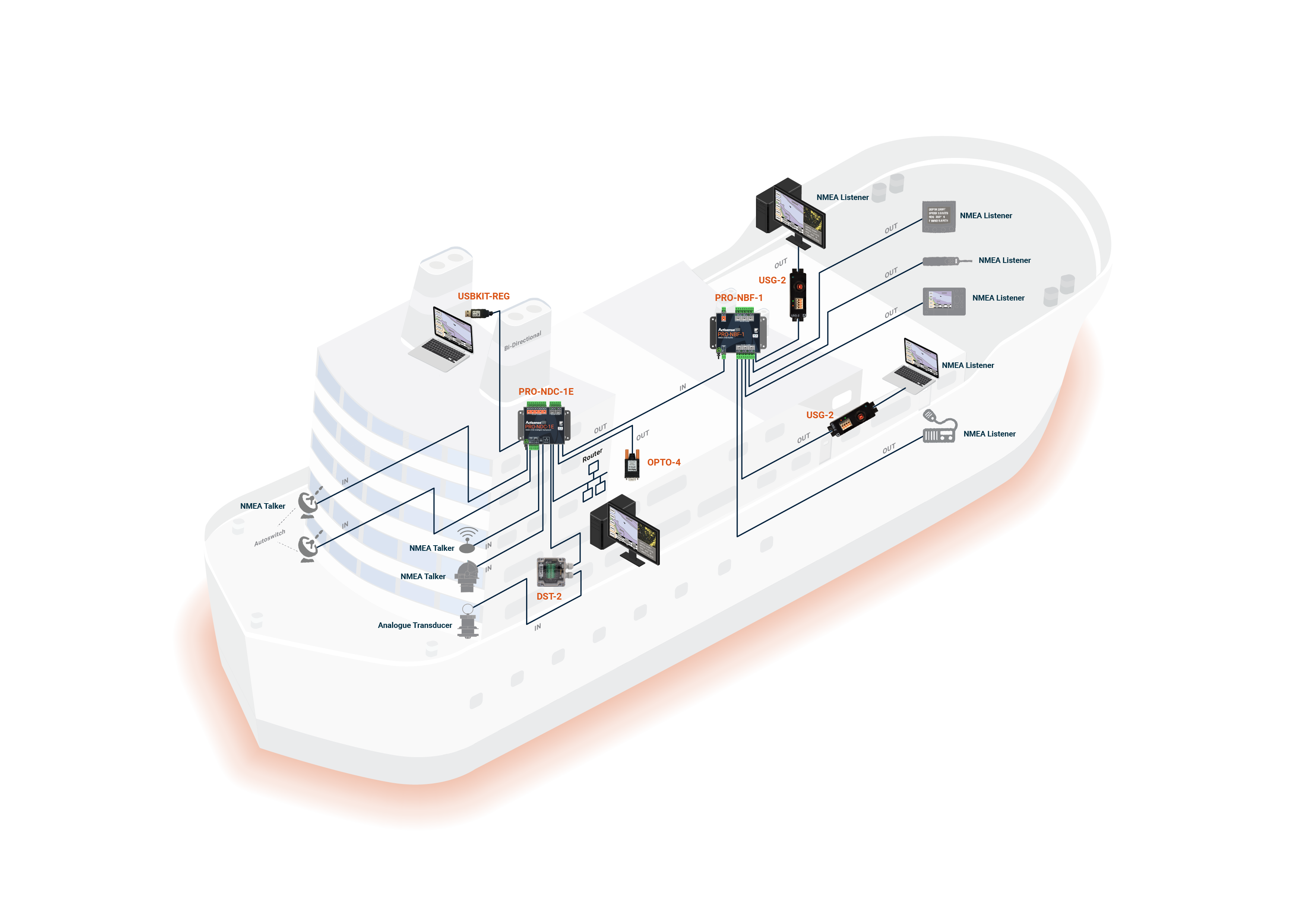
Understanding the basics of NMEA 0183
Over twenty years ago, the National Marine Electronics Association (NMEA) developed a standard for interfacing electronic equipment on vessels, allowing navigational computers and instruments to share vital information with one another. That standard, NMEA 0183, went on to become the common method by which marine electronic devices could talk to one another.
The standard covers three things: the electrical connections that make up an NMEA system, the method used to transfer data across that connection, and the format of the “sentences” that carry the data itself.
The NMEA 0183 standard is a purely digital data transmission method. Using a binary format of ‘1’ and ‘0’, to communicate a digital representation of the required data to a connected device.
NMEA 0183 evolved from the earlier standards (NMEA 0180 and 0182). Because those older standards use different baud rates and transmission parameters, they are not compatible with NMEA 0183. Likewise, the newer NMEA 2000 standard is a completely different system. The two cannot be mixed on the same network without a specialist gateway device sitting between them and converting between the two standards, such as the Actisense NGX-1 conversion gateway.

The Basics
The NMEA standard defines the electrical signalling, data protocol and sentence formats used on a serial data bus.
Talkers and Listeners
Data is transmitted from a source device such as a GPS, depth sounder, or compass. These source devices are known as “Talkers.” Equipment that receives this data, such as chartplotters, radar set, PC, or dedicated NMEA display, is known as a “Listener.”
Every NMEA 0183 connection has exactly one Talker, but it can support many Listeners.
Voltage & signalling
From version 2 onward, the specification requires equipment to meet, as a minimum, the RS422 computer standard (EIA-422-A), using low-voltage +5V / 0V signalling that’s straightforward to interface with computer equipment.
That said, voltage levels on an NMEA 0183 network can be considerably higher, up to ±15 volts, particularly on older equipment, since the original version 1 specification used ±12–15 volt signalling. As a result, any NMEA 0183 input built to v2.0 or later must be able to safely receive ±15 volt differential signals without damage.
Isolation & wiring
The specification also requires all receiving equipment to be opto-isolated. This reduces the risk of interference and eliminates problems caused by ground loops.
All connections should use twisted-pair cabling with a shield. To avoid ground loops. that shield should only be connected at one end; the NMEA standard specifies it should be connected to the Talker’s chassis.

Range
Signal range is also worth knowing: a properly wired NMEA 0183 connection can reliably carry data over distances of up to around 100 metres.
Communication Specification
All NMEA 0183 data is sent in printable ASCII form (data bit 7 is always zero in NMEA 0183 data transmissions, and all characters should be between ASCII HEX 20 and HEX 7E). This means that it can be viewed directly on a PC “terminal” type program (like ‘HyperTerminal’), even if what appears on screen doesn’t mean much as is.
Note: NMEA 0183-HS or NMEA 0183 v3 is not related to the newer NMEA 2000 standard, despite what some manufacturers imply. It uses an entirely different electrical connection standard that is not compatible with NMEA 0183 in any way.
If you need to convert between NMEA 0183 and NMEA 2000, the Actisense NGX-1 Gateway will allow full bidirectional conversion between the two standards.

Common NMEA 0183 sentence types
NMEA 0183 data is transmitted as short text strings called “sentences,” each starting with an identifier that tells a Listener what kind of data follows. Here are some of the most common:
| Sentence | Meaning | Typical Talker |
|---|---|---|
| GGA | Global Positioning System Fix Data | GPS |
| GLL | Geographic Position - Latitude/Longitude | GPS |
| RMC | Recommended Minimum Navigation Information | GPS |
| VTG | Course Over Ground and Ground Speed | GPS |
| GSA | GPS DOP and Active Satellites | GPS |
| GSV | GPS Satellites in View | GPS |
| ZDA | Time and Date | GPS / clock source |
| DBT | Depth Below Transducer | Depth sounder |
| MWV | Wind Speed and Angle | Wind instrument (anemometer) |
| HDG | Heading, Deviation and Variation | Compass / heading sensor |
A single device can transmit several sentence types on the same connection – a GPS, for example, typically sends GGA, RMC, and VTG in sequence. Listeners are usually built to recognise and use only the sentences relevant to them, ignoring the rest.
Because sentence formats are standardised, a Listener from one manufacturer can read a Talker’s data from a completely different manufacturer, provided both follow the same NMEA 0183 version. This is what makes NMEA 0183 useful across a mixed-brand marine electronics setup.
The Differing Versions of The 0183 Standard
As the NMEA 0183 specification has gradually evolved over the years, connecting one device to another isn’t always straightforward. This is complicated further by the fact that many manufacturers still use the older “single-ended” method of connection, simply because it’s cheaper to implement.
So how do you connect an older NMEA device to a newer one? Care is needed: it’s possible to damage or overload the output of a newer differential device if it is incorrectly connected to an older device.
This happens because older devices used ground as their return path, while newer devices actually drive the NMEA “-/B” line between 5v and 0v. Connecting that output to ground causes high current to be drawn by the driving instrument, which can overheat and damage its circuits.
Introducing Actisense ISO-Drive™
To solve these fundamental interfacing problems, Actisense fits ISO-Drive outputs to all its products. These outputs provide the isolation needed to keep a system safe when mixing equipment from different manufacturers on a complex marine system. If the ISO-Drive “B” line is connected to ground, no current will flow, and the system is safe.
