


 | Published: November 11, 2026 | Updated: November 11, 2026

Before choosing a gateway, multiplexer or buffer, answer five questions: what’s onboard and who’s talking, which protocol each device uses, where the data needs to go, how many talkers share each input, and what the vessel must comply with. Your answers point straight to the right product. Use the Product Finder to turn them into a shortlist.
Most of the questions our support team answers aren’t about faulty products. They’re about products bought for a different setup. A device that’s perfect for one installation can be the wrong choice for the next. The usual cause is that nobody mapped the network first.
The good news is that mapping it takes a few minutes and a notepad, and will save you time later. Work through the five questions below for your vessel, and you’ll know what you need and what you don’t.
1. What’s onboard and which devices are talking?
Start with a list of every device that sends or receives data. Label each one as a talker, a listener or both.
- Talker: sends data (e.g., GPS, depth sounder, wind sensor, AIS transponder)
- Listener: receives data (e.g., display, autopilot needing heading)
- Both: conversion gateways, VHF/radio
Include the things that are easy to forget: engine senders, tank levels, the laptop at the nav station, and the app on your phone.
2. Which protocol does each device use?
Next to each device, note whether it uses NMEA 0183, NMEA 2000 or a proprietary protocol. Mixed lists are normal on boats that have been upgraded over the years.
| NMEA 0183 | NMEA 2000 | |
|---|---|---|
| Wiring | One-to-one | Shared backbone with drop cables |
| Talkers per connection | One | Many |
| Typical speed | 4,800 baud (38,400 for AIS) | 250 kbit/s |
| Adding a device | New wiring run | Plug a drop into the backbone |
If both protocols are on your list, you need conversion between them. That’s what a conversion gateway such as the NGX-1 or WGX-1 does.
How do I build a hybrid NMEA 0183 and NMEA 2000 network? | For older boats: How to future-proof your legacy systems
3. Where does the data need to end up?
List every destination outside the instrument network. Each one needs a connection type, and that often decides the product.
| Destination | Connection | Typical use |
|---|---|---|
| Phone or tablet app | Wi-Fi | Navigation apps, remote monitoring |
| PC or laptop | USB | Navigation software, diagnostics, logging |
| Vessel LAN | Ethernet | Commercial MFDs, bridge systems, multiple PCs |
| Cloud | Internet via onboard router | Fleet and remote monitoring (ActisenseCloud) |
Plan for destinations you’ll want next season as well as this one. One device that covers both is usually cheaper than buying a second one later.
Which Actisense NMEA gateway is right for you? | How to share NMEA data over Ethernet
4. How many talkers share one input?
On NMEA 0183, this question decides between a multiplexer and a buffer.
- Many talkers → one listener: an NMEA 0183 input can only listen to one talker. To get GPS, AIS and heading into a single charplotter input, you need a multiplexer.
- One talker → many listeners: a talker can only drive a limited number of listeners before the signal degrades. To feed GPS to a VHF, radar and autopilot, you need a buffer.
NMEA 2000 doesn’t have this problem because every device shares the backbone. It has its own limits instead: a maximum number of devices, backbone length, and a power budget.
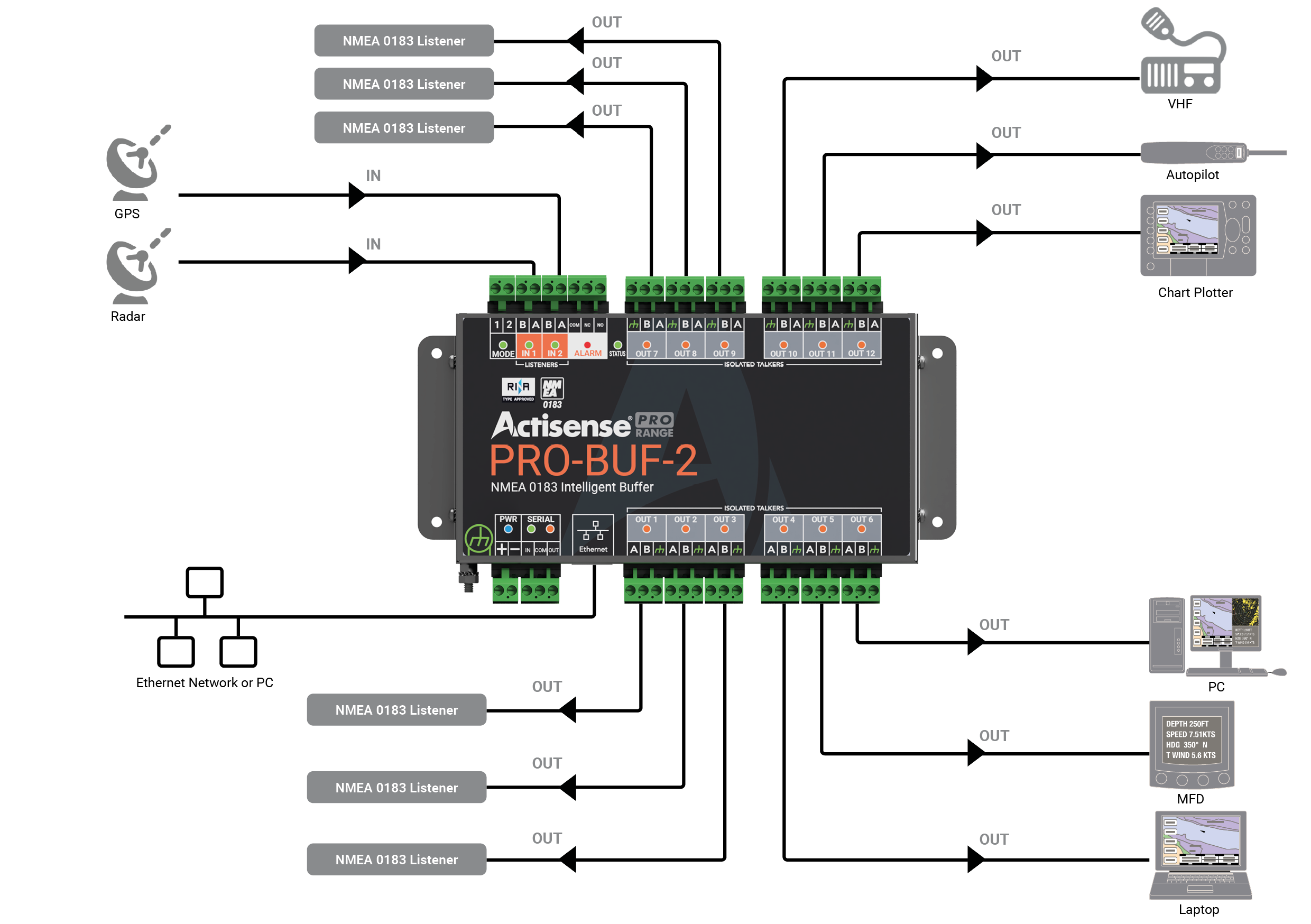
Which NMEA 0183 multiplexer/buffer do I need?
5. What does the vessel need to comply with?
Commercial vessels, workboats and some superyachts may need Type Approved equipment, which narrows the choice to certified products such as the PRO range.
Two more checks apply to every boat:
- Isolation: opto-isolated inputs prevent ground loops, which cause some of the trickiest faults to trace on a mixed network.
- Power and capacity: on NMEA 2000, check the network size and capacity, giving consideration to power insertion location and the option of using multiple power tees.
Example: a 12m cruising yacht
| Device | Protocol | Role | Needs data from |
|---|---|---|---|
| Chartplotter | NMEA 2000 | N/A | GPS, wind, depth, AIS |
| Wind and depth instruments | NMEA 2000 | N/A | - |
| AIS | NMEA 0183 (38,400) | Both | GPS |
| VHF with DSC | NMEA 0183 | Both | GPS |
| Autopilot (older) | NMEA 0183 | Both | Heading, waypoints |
| PC Gateway | NMEA 0183 | Listener | Everything |
What the map tells us:
- Both protocols are onboard, so 0183 ↔ 2000 conversion is needed (Q2).
- There is a PC connection requirement: USB (Q3).
- Three 0183 devices would otherwise need their own wiring runs. Bringing them onto the backbone through conversion is simpler than a separate 0183 multiplexer setup (Q4).
- It’s a leisure vessel, so Type Approval isn’t needed, but isolated inputs still matter (Q5).
Entered into the Product Finder, these answers narrow down to the NGX-1:

Got your answers? Find your product.
Tick what you want to do, add your must-haves (Type Approval, Ethernet, USB), and the Product Finder shows the Actisense products that fit.
[actisense_finder_promo style=”chips” goals=”c1,p2,m1″ needs=”ta” heading=”Got your answers?” text=”Pick the job that matches yours and the Product Finder shows what fits.”]
Still unsure? Send your device list to our support team. It’s the first thing they’ll ask for.
FAQs
Do I need a gateway if all my devices are NMEA 2000?
Not for conversion. You’d still need one to get data onto a PC, app or Ethernet network.
Can I connect two NMEA 0183 talkers to one input?
No. An NMEA 0183 input listens to one talker. Use a multiplexer to combine several into one output.
What’s the difference between a talker and a listener?
A talker sends data and a listener receives it. Many devices do both.
How many devices can go on an NMEA 2000 network?
The standard allows up to 50 physical devices on one network, within backbone length and power limits.
Do I need Type Approved equipment?
Usually only on commercial vessels or where a flag state or classification society requires it. Check with your surveyor.
 Which Actisense NMEA Gateway is right for you?
 Which NMEA 0183 multiplexer/buffer do I need?
 How do I build a hybrid NMEA 0183 and NMEA 2000 network?